Build and download a free capability statement PDF
Fill in five short steps, choose one of three templates, and download a one-page capability statement as a PDF.
Written By GovPreneurs
Last updated 21 days ago
A capability statement is a one-page summary of what your business does. Buyers ask for it. This tool turns your answers into a PDF.
Steps
- Open tools.govpreneurs.com. Click Cap statement in the tool tabs.
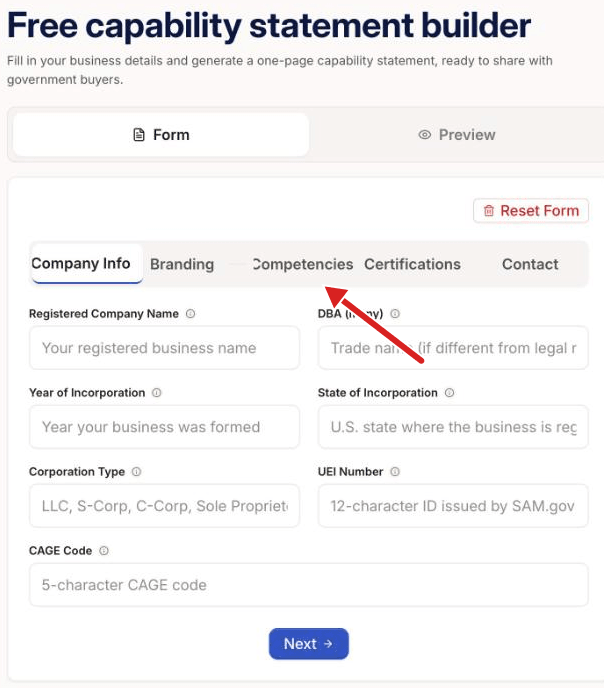
- In the tab Form, fill in the step Company Info. Click Next.
- Fill in Branding, Competencies and Certifications. Click Next after each step.
- In Contact, enter your contact details. Click Generate Capability Statement.
- In the tab Preview, choose a template under Choose a Template.
- Click Download PDF.
The three templates
- Classic Federal: a navy header with an accent line.
- Modern Split: a sidebar for company facts and a narrative on the right.
- Executive Elegant: serif type with gold accents on a cream page.
Sign in to download
If you are not signed in, Download PDF asks for your email. You enter a code that we send. Then the PDF downloads. See Sign in to save or unlock a free-tool result.
What you see next
The preview shows your statement as you change the template. The tool saves your entries on this device. You can add a logo as a PNG or JPG file.
Check before you share
The tool does not check your facts. Make sure that your codes and certifications match your SAM.gov record. The tool gives no legal or procurement advice.
⚠️ If this does not work: Read Why a tool result is missing, locked, or out of date.
Related articles
Was this helpful?
Still need help? Share an idea