Switch between federal and state or local opportunities
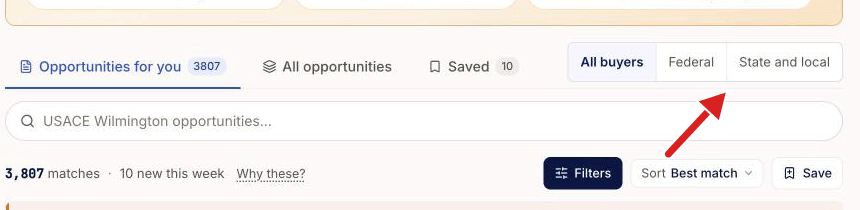
Use the buyer switch above the list to show all buyers, only federal buyers, or only state and local buyers.
Written By GovPreneurs
Last updated 21 days ago
Use the buyer switch to choose whose bid requests you see. SLED means state, local and education buyers. On the Pilot plan, the Opportunities page is locked. See Why an opportunity or Hunter action is locked.
Steps
- In the left menu, click Opportunities.
- Find the switch on the same row as the three tabs.
- Click All buyers, Federal or State and local.
- Read the list. The count on each tab now follows your choice.
What the choices mean
- All buyers shows federal and state and local opportunities together.
- Federal shows only opportunities from federal agencies.
- State and local shows only opportunities from state, local and education buyers.
Each card carries a small pill. Fed marks a federal buyer. SLED marks a state or local buyer.
How the switch behaves
- The switch stays on when you change between the three tabs.
- Clear all does not reset the switch.
- A saved search does not keep the switch.
What you see next
The list and the counts change at once. If you choose State and local, the cards show SLED pills only.
⚠️ If the list is empty: Try All buyers. Then read Why there are no matches or results. To set the states where you work, see How do I update what my business can take on?.
Related articles
Was this helpful?
Still need help? Share an idea