Narrow opportunities by trade, location, buyer, job size, and deadline
Use Filters on the Opportunities page to show only the bid requests that fit your trade, area, size and timing.
Written By GovPreneurs
Last updated 21 days ago
Use Filters on the Opportunities page to show only the bid requests that fit your trade, your area, your size and your timing. On the Pilot plan, the Opportunities page is locked. See Why an opportunity or Hunter action is locked.
ℹ️ Before you start: In the Filters panel, the options that come from your business facts show the tag from your profile. Hunter does not select them for you. If your trade codes or states are wrong, correct them first in My Business. See Which business facts affect opportunity matches?.
Steps
- In the left menu, click Opportunities.
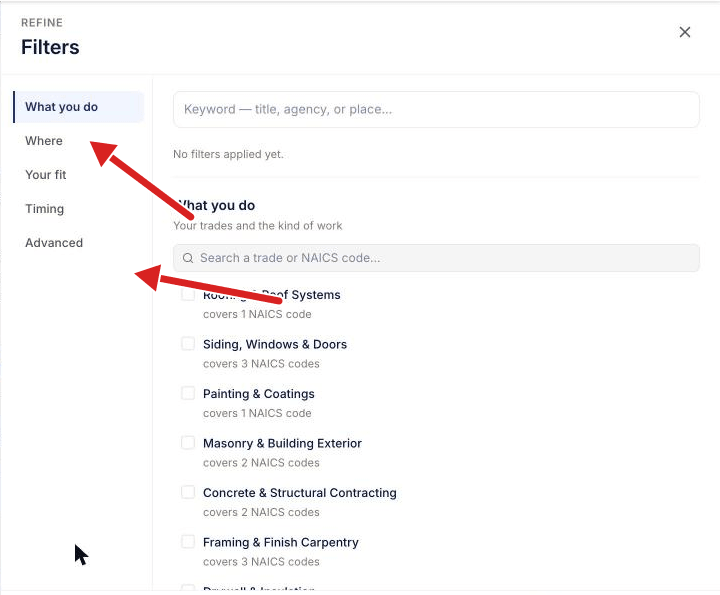
- Click Filters. The Filters panel opens.
- In What you do, select your trades or the kind of work.
- In Where, select the states where you can do the work. To choose cities, expand a state.
- In Your fit, set the Job size that your business can take on.
- In Timing, select when the bid must close in Closing. If you want only new notices, select a period in Posted.
- At the bottom of the panel, click Show [number] matches.
Filter by buyer or set-aside
- To show only some agencies or notice types, open Advanced in the Filters panel.
- You cannot filter by county or ZIP code. Use states and cities in Where.
- Set-asides are also in Advanced. A set-aside is a bid request that only a certain type of small business can bid on.
- To switch between federal and state or local buyers, use the switch above the list. See Switch between federal and state or local opportunities.
What you see next
The list shows only the opportunities that match all of your filters. The number of matches shows above the list.
⚠️ If you see no results: remove one filter at a time. If the list is still empty, read Why there are no matches or results.
Related articles
Was this helpful?
Still need help? Share an idea