Tell Hunter which parts or product categories you sell
In Narrow this down, select the kinds of parts that you sell, and the Small orders board then shows only those parts.
Written By GovPreneurs
Last updated 21 days ago
Select the kinds of parts that you sell. Hunter then shows only those parts. Your choice is remembered.
Steps
- In the left menu, click Small Orders.
- Click Narrow this down.
- Under What do you sell?, select each category that fits.
- Click Show orders.
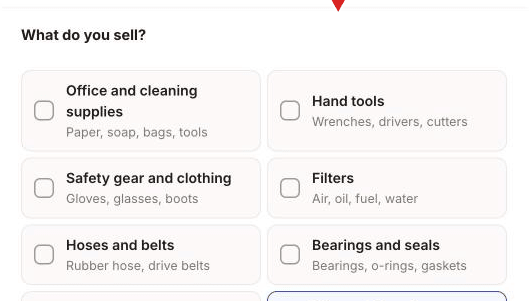
The categories
- Office and cleaning supplies
- Hand tools
- Safety gear and clothing
- Filters
- Hoses and belts
- Bearings and seals
- Pipes, valves and fittings
- Wire, cable and connectors
- Electrical parts
- Metal stock and sheet
- Engine parts
- Bolts, screws and fasteners
Each category shows a short hint, such as "Gloves, glasses, boots".
Good to know
- If you have not chosen before, Hunter may select categories for you. It says: "Picked from the NAICS codes in your profile. Change anything that is wrong."
- To see every part, select none. The panel says: "Pick none to see every part."
- The board lists only parts that DLA buys. If you sell something else, it is not on the board.
What you see next
The board shows a line above the list that names your choice, with Show all next to it. Click Show all to clear your categories and any other narrowing.
If no order fits, the board can say "Nothing today for" and the category. It then says: "That is normal. New orders arrive every weekday."
⚠️ If the board is empty: Read Why no small orders appear for your business.
Related articles
Was this helpful?
Still need help? Share an idea