Changelog
Follow new updates and improvements to GovPreneurs.
In October, two smaller changes improved your matches and My Business.
Improved
- Better matches from your NAICS codes. Hunter now matches you on the NAICS codes that come from a known source. These are your registrations, your capability statement, My Business and Hunter. If you have such codes, Hunter no longer uses a code with no known source.
Fixed
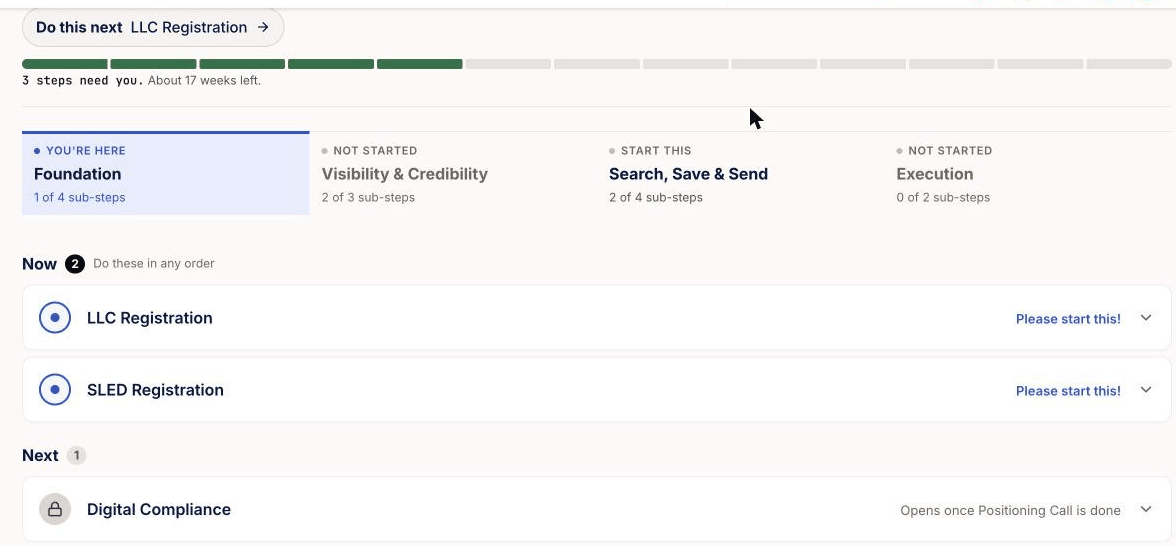
Your Roadmap now shows what to do now, what comes next, and what you finished.
The Roadmap has three groups: Now, Next and Completed. Click Do this next to open the next Roadmap step that needs you. It skips the Roadmap steps that you bought. Digital Compliance waits in Next until your Positioning Call is done, but you can still open it.
Your Success Center home now shows the same progress as the Roadmap. You can also buy Prime Registration again, one prime at a time.
How do I use my GovPreneurs Roadmap? How do I find the next step that needs me?
In September, the Success Center added a page for your tasks, and more Roadmap steps complete themselves.
New
- Your tasks. A page with All, Roadmap and Action Plan tabs, in deadline order. Action Plan lists what your mentor asked you to do. How do I use Your tasks?
Improved
Fixed