How do I upload and verify my LLC paperwork?
In the LLC Registration step, upload your Articles of Organization as a PDF and click Verify.
Written By GovPreneurs
Last updated 21 days ago
You can check your LLC paperwork yourself. The Roadmap reads the PDF and shows what it found.
ℹ️ Before you start: have your Articles of Organization as a PDF file. The file must be 10 MB or smaller. Other state formation papers, such as a Certificate of Formation, also work.
Steps
- In the left menu, click Roadmap.
- Open the Foundation tab. Click LLC Registration.
- Find Already did this yourself?. Click Verify your LLC.
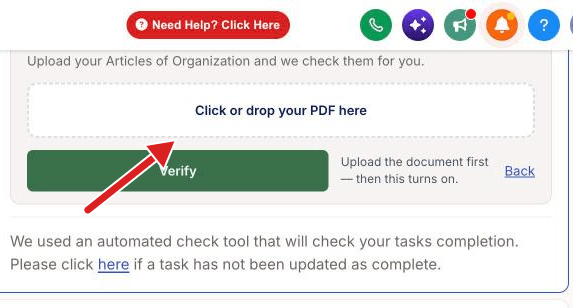
- Click Click or drop your PDF here. Choose your PDF.
- Wait until the area says PDF uploaded — click to replace.
- Click Verify.
What you see next
- The card says Review and confirm and shows the facts that the check read. Read them.
- If the facts are right, click Yes, this is correct — confirm. The card then says Verify your LLC — verified, and the step turns to done.
- If the facts are wrong, click Upload a different document.
- If the check does not pass, the card lists What is missing. Click Try again.
- For the meaning of each result, read What does a passed, failed, or unavailable verification mean?.
If the upload fails
Only PDF files work. The portal shows a message when the file is too large or the wrong type. Try again in a minute. If it keeps failing, click Need Help? Click Here.
Related articles
Was this helpful?
Still need help? Share an idea