Ask Hunter to find or narrow opportunities in plain language
Type a request in the Hunter chat box, for example the work and the place, and Hunter changes the filters on the list to match.
Written By GovPreneurs
Last updated 21 days ago
Hunter is the AI assistant on the Opportunities page. You can ask in your own words. Hunter then sets the filters for you. On the Pilot plan, the Opportunities page is locked. See Why an opportunity or Hunter action is locked.
Steps
- In the left menu, click Opportunities.
- Find the Hunter panel on the right. It reads "Hunter · your discovery agent".
- Click one of the question buttons, or click the Ask Hunter box.
- Enter your request. For example, the kind of work and the state.
- Press Enter, or click the send button.
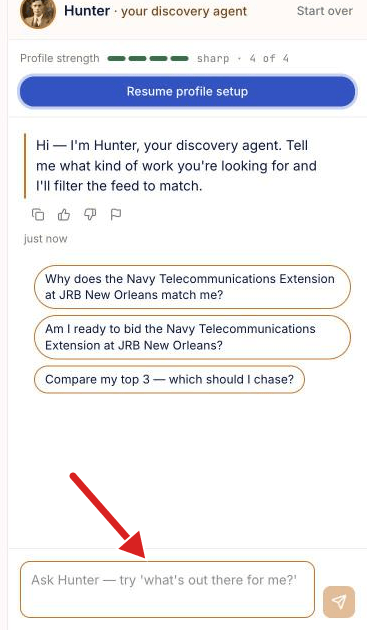
You can also click Ask Hunter next to the search box.
Question buttons
On your first visit, the intro card at the top of the feed shows three fixed questions. One is What's out there for me right now? It stays until you close it. The buttons in the Hunter panel change with the tab. An example is Compare my top 3 — which should I chase?
What you see next
- Hunter answers in the panel.
- A Using row above the answer lists the filters that Hunter used.
- The list on the page changes to match.
If Hunter cannot use a filter, the answer says so. The filters you can set yourself are in Filters. See Narrow opportunities by trade, location, buyer, job size, and deadline.
Start again
Click Start over at the top of the Hunter panel. Hunter clears the conversation, the filters and the search words.
⚠️ If Hunter shows "Something went wrong — try again.": Send your request again. If it repeats, read My feed or detail page did not load or click Need Help? Click Here.
Related articles
Was this helpful?
Still need help? Share an idea