Read an opportunity card before opening the notice
Each card gives Hunter's reason, the buyer, the value, the place and the date, so you can decide if a notice is worth opening.
Written By GovPreneurs
Last updated 21 days ago
A card tells you five things: why it fits, who buys, how big it is, where the work happens and when it closes. Read these before you open the notice. On the Pilot plan, the Opportunities page is locked. See Why an opportunity or Hunter action is locked.
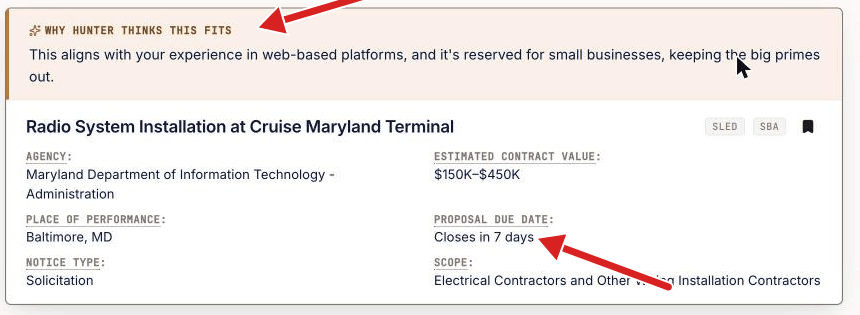
The parts of a card
The date text
- Closes in N days counts the days left.
- Closes today and 1 day left mean the time is short.
- Closed means the date passed.
- No deadline on file means our record holds no date. It does not mean that the buyer gave none.
The chips
- Fast award: the buyer can buy quickly.
- Need to certify: you may need a certificate first.
- Prereq needed: something must be cleared before you can bid.
- Updated: the buyer changed the notice. Read it again.
What a card cannot tell you
- Not stated in Notice type or Scope means that our record holds no value for that cell.
- A card is a summary. The notice has the rules.
✅ What to do next: Click the card to open the opportunity. Then read Read an opportunity with Grant.
Related articles
Was this helpful?
Still need help? Share an idea