Find and read a mentor-review conversation
Open Mentor Reviews in the left menu, click a review in the list, and read the mentor's answer in the thread.
Written By GovPreneurs
Last updated 21 days ago
Your mentor answers a review in a conversation. Open the conversation to read the answer, the recommendation and any files.
ℹ️ Before you start: You must have sent an item to a mentor. See Send an opportunity or small order to a mentor for review. Mentor reviews are part of the Expert and Elite plans.
Steps
- In the left menu, click Mentor Reviews. The screen says "Mentors" in some messages. This is the same place. The Mentors item is for booking calls. The Mentor Hub card Mentor reviews opens the same list.
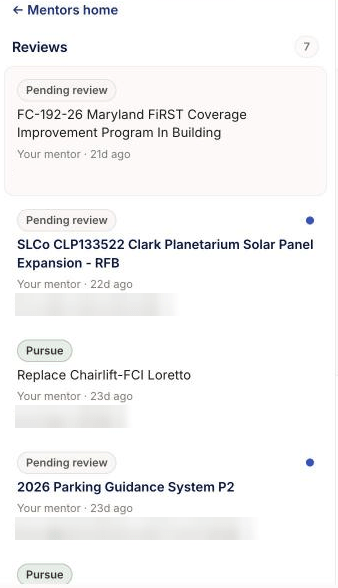
- In the list headed Reviews, find the review. A blue dot marks an unread review.
- Click the review. The conversation opens on the right.
- Read the messages from top to bottom. Click a file name to open an attachment.
- To open the item that was reviewed, click the title at the top of the conversation.
You can also open the conversation from the opportunity page. Click the status button that reads "Mentor reviewing · view in Mentors →" or "Mentor responded · view in Mentors →". Your Pipeline also has a card for each review. See Pipeline: revisit saved work and mentor reviews.
What you see next
The list shows a status badge, the mentor name, the time and the last words. The badge reads Pending review, Responded or Closed. When the mentor gives a recommendation, the badge reads Pursue, Discuss or Pass. See Understand mentor review status and recommendation.
The page checks for new messages about once a minute. If the list is empty, it reads "No mentor reviews yet".
⚠️ If this does not work: If the page says "Review not found", go back to the list. If a conversation does not load, refresh the page. See What to do if a payment, attachment, or reply fails.
Related articles
Was this helpful?
Still need help? Share an idea