Find a NAICS code and its federal award data
In the NAICS search, enter a trade word or a code to see the codes that federal agencies buy under, ranked by award count.
Written By GovPreneurs
Last updated 21 days ago
A NAICS code is a number that names your kind of work. NAICS means North American Industry Classification System. SAM.gov and bid notices use these codes.
ℹ️ Before you start: You do not need a member account. To open the full snapshot for a code, you enter your email and a code. See Sign in to save or unlock a free-tool result.
Steps
- Open tools.govpreneurs.com. Click NAICS in the tool tabs.
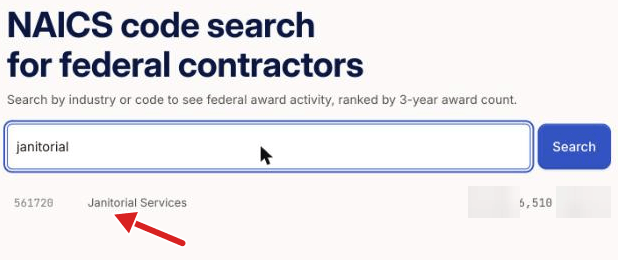
- Enter a trade word or a code in the field. Examples are "janitorial" or "561720".
- Click Search.
- Read the list. The tool ranks the codes by the number of federal awards in three years.
- Click a code to see its headline figures.
Other ways to look
- Before you search, or if the search finds nothing, click Browse industries to look by industry group.
- Click See demand for this code to open the Demand check for that code. See Check whether the government buys what you sell.
- Click Check if you're ready to bid to open the scorecard. See Take the bid readiness scorecard.
What you see next
The page shows the code, its title and the award data. Click Email me my snapshot to open the full snapshot and the PDF.
The figures come from federal award records. They show past awards.
Use the code
Add the code to My Business so that Hunter can use it. See How do I read and change Your trade codes?.
⚠️ If this does not work: If the search shows nothing, try one common word. For other problems, read Why a tool result is missing, locked, or out of date.
Related articles
Was this helpful?
Still need help? Share an idea