Where do I see my wallet balance and usage history?
Your wallet card on the Success Center home shows your balance. Click Usage History to see every charge.
Written By GovPreneurs
Last updated 21 days ago
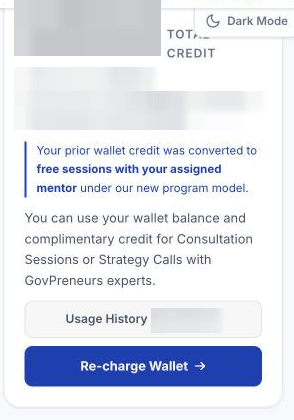
The wallet pays for mentor calls that are not included, mentor reviews and done for you services. The wallet card is on your Success Center home.
What the card shows
- Total credit: both amounts below added together.
- Wallet balance: money that you paid in.
- Promotional credit: a gift from GovPreneurs. The card says: "Used first on purchases. Not refundable."
- Outstanding: a warning, only if you owe an amount. See What is an outstanding wallet balance and when is it collected?.
Steps to see your charges
- In the left menu, click Success Center.
- On the wallet card, click Usage History. The Wallet Usage panel opens.
- Use Type to show All, Services or Calls.
- Use Date range to show the last 30 or 90 days, the last 12 months, or all time.
- Click a row to open its details. They show the price, the payment method and the order ID.
What you can do here
- Why is my wallet balance unavailable?: Fix a balance that does not show.
- What is an outstanding wallet balance and when is it collected?: Learn what an outstanding balance is.
- Why was a booking charge refunded?: Learn why a booking charge came back.
- Why is my wallet balance too low for this call or service?: Fix a balance that is too low.
Add money
Click Re-charge Wallet. The billing page opens in a new tab. See Add funds to your wallet.
Some accounts also show a receipt in each row. Not every account has receipts.
Related articles
Was this helpful?
Still need help? Share an idea