How do I find posts and topics in the Community?
Open a group in the Community, then use the search box, All Posts, the channels or Featured Posts to find the topic that you need.
Written By GovPreneurs
Last updated 21 days ago
Each Community group sorts its posts into channels. You can also search. Use the method that fits your question.
Steps
- In the left menu, click Community.
- Under My communities, click your group.
- Click the tab Discussion.
- To search, enter a word in the box Search for posts, comments or member.
- To browse, click All Posts or a channel on the left.
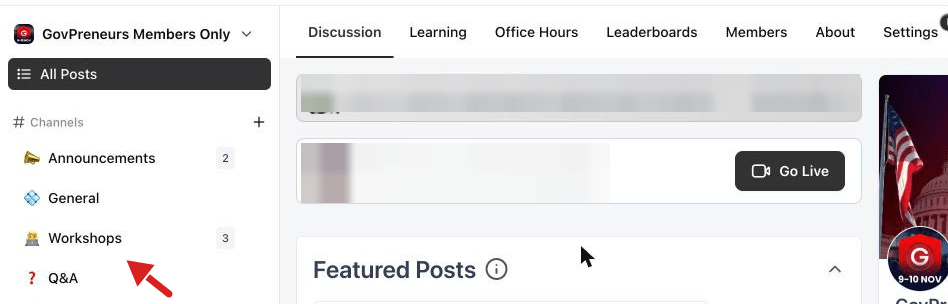
The channels
The channel list on the left shows these names:
- Announcements
- General
- Workshops
- Q&A
- Who's who?
The list also has topic groups. Platform Guide has Start Here, AI Employees and CRM. GovCon has Pro Tips, Federal Contracting, State, Local & Education, Teaming, SBA Programs, Grants & Loans and Solicitation & Proposals.
Featured posts
The block Featured Posts shows the posts that the team picked. Read it first when you are new.
What you see next
The list shows the posts that match your search or your channel. If nothing shows, try a shorter word.
⚠️ If this does not work: If your group is missing under My communities, send a message through Need Help? Click Here. See How to report a problem or request help.
Related articles
Was this helpful?
Still need help? Share an idea