How do I review a proposed fact and see its source?
How to read the source of a suggested fact from a call, a chat or a document, and then keep it or say no.
Written By GovPreneurs
Last updated 21 days ago
Hunter and your mentor can suggest facts for your record. A suggested fact does not join your record until you say yes. This keeps your record true.
Steps
- In the left menu, click My Business.
- Find a row that shows a suggested fact. The rail on the left shows how many facts to check in each part.
- Read the line above the buttons. It names where the fact came from.
- Click the source name. A window opens. Its title is Source and the source name.
- Read the words in the window. Click × to close it.
- Click Yes, that is right to keep the fact. Click No, leave it if it is wrong.
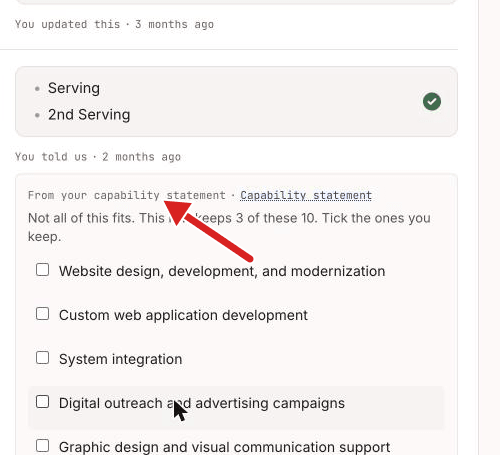
If the card holds a list
Some cards hold more items than the row can keep. The card then says how many the row keeps. Select the items that you want to keep and click Keep these. The card shows "You kept x of the y you may keep."
What you see next
After Yes, that is right, the fact joins your record. The row keeps its source line. You can still change the fact later with Change.
After No, leave it, the fact does not join your record. See How do I decline a proposed fact?.
Rows with the chip Check this
Some rows hold a value that needs a quick check. The chip Check this or Worked out for you shows on the row. Click Yes, that is right if the value is correct. Click Change if it is not.
⚠️ If this does not work: If the card shows an error, follow the message. If the list on the card changed, reload the page. To see more about sources, read Where did this business fact come from?.
Related articles
Was this helpful?
Still need help? Share an idea